


What is the Best Theme to Use with Bricks Builder?

Many people search for the perfect theme to pair with Bricks Builder, but the real answer might not be what you expect. The best fit could be hiding in plain sight…

  • Updated on: August 12, 2025

Wasim Akram

Blog Author

WPnomy - Default Featured Image

NO Theme Required!

⚠️ Spoiler Alert: Bricks Builder is the THEME itself, and it comes out of the box with its own built‑in builder. So Bricks is both your theme and your builder; two-in-one.

However, if you really want to use a theme with Bricks Builder, I would suggest using the Bricks Child Theme.

Now, let me clarify your confusion.

I understand you’re used to working with a theme alongside other WordPress page builders like Elementor, so asking this question is completely normal.

However, unlike those other website builders, Bricks is completely different.

Even though it’s a builder, as the name suggests, it actually comes as a WordPress theme, NOT a plugin.

Fun fact! When I initially bought Bricks, I literally tried to install it in the Plugins section since I used to use Oxygen Builder before, which was a plugin.

Later, I checked the documentation and found out it’s actually a theme LOL.

So don’t try uploading it in the Plugins section; it won’t work. Themes aren’t built like plugins, so WordPress won’t recognize them, and you’ll just get the error: “No valid plugins were found.”
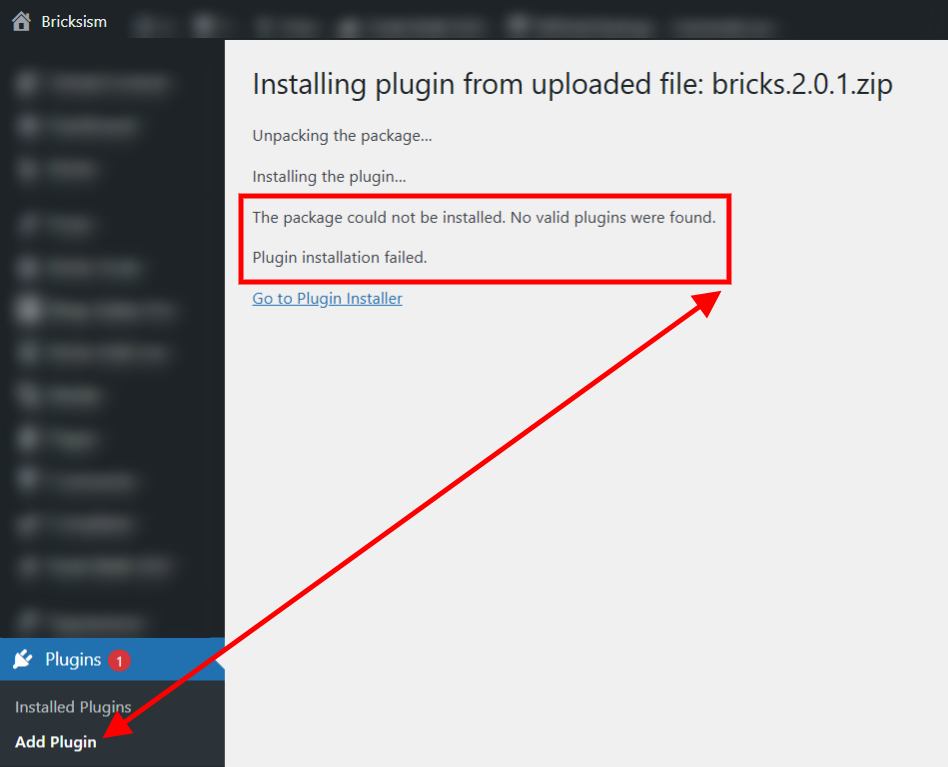
No valid plugins were found - Screenshot - Bricksism

This means that once you purchase Bricks and get your download file (plus your license), you will need to upload it to the Themes section inside the WordPress Customizer.

How to install Bricks Builder in WordPress?

From your WordPress Dashboard:

  1. Log in to your WordPress admin area.
  2. In the left‑hand menu, hover over “Appearance.”
  3. Click “Themes.”
  4. On the Themes page, click the “Add New” button at the top.
  5. Then click “Upload Theme”, select your bricks.zip file from your computer, and click “Install Now.”
  6. Once installation is complete, click “Activate” to make Bricks your active theme.
  7. Lastly, in your WordPress dashboard, look for the Bricks option in the left sidebar.
  8. Click it to open the menu, then select License.
  9. Enter (or paste) the license key you got from your Bricks portal, and press Activate License to complete the setup.

Conclusion

So here’s the bottom line; Bricks Builder isn’t just a page builder, it’s both your theme and your builder wrapped into one.

That means you don’t need to go hunting for another theme to use with it.

If you want to tweak or expand it, just use the Bricks Child Theme.

Honestly, I made the same mistake at first; I tried installing it as a plugin because I was coming from Oxygen, which is a plugin.

Later I found out it’s actually a theme, and it all made sense.

Just upload it through Appearance → Themes, activate it, set up your license key, and you’re ready to start building. Simple as that.

5 1 vote
Article Rating
Subscribe
Notify of
guest
0 Comments
Most Voted
Newest Oldest

Related Posts You’ll Love

Keep exploring and sharpen your WordPress skills with more expert guides, tips, and inspiration tailored just for you. Each post is carefully crafted to help you build faster, solve real-world challenges, and get the most from WP.

Explore More Posts
Next Bricks - Featured Image - WPnomy

Next Bricks Review: Worth It for Bricks Builder Developers?

Next Bricks adds 50+ unique elements, GSAP animations, and Barba.js page transitions to Bricks Builder. Honest review after testing and community research.

Read Now
Oxyfolio Review - Featured Image - WPnomy

Oxyfolio Review (2026): The Best Elements Addon for Oxygen 6?

Oxyfolio adds 120 unique elements to Oxygen 6 with a one-time €119 payment. Here's my honest review after testing it, including where it shines and who should skip it.

Read Now
WPnomy - Default Featured Image

Best Breakdance Templates (2026): Design Sets & Libraries

Handpicked Breakdance template kits, design sets, and block libraries reviewed for 2026. Free options, pricing, and clear ratings to help agencies and developers pick the right one fast.

Read Now

Connect. Learn. Build Together.

Become part of the WPnomy family; a vibrant, supportive community where freelancers, designers, and agencies come together to share insights, ask questions, and celebrate wins. Here, you’ll find encouragement, real-world tips, and a network of passionate WordPress users ready to help you grow.

Join Facebook Community
  • Connect with passionate WordPress users who share your goals and challenges.
  • Access practical tips, insider tricks, and real-world solutions tailored for all skill levels.
  • Share your progress, get feedback, and celebrate your wins with a supportive network.
  • Stay updated on the latest WordPress features, tutorials, and community events.
  • Experience friendly mentorship and no-fluff guidance, making web building easier and more fun.

Kickstart Your Bricks Builder Journey Faster with Our Blueprint Bundle

If you’re new to Bricks Builder and want to skip the overwhelm, the Bricks Blueprint Bundle is a game-changer. Paired with Automatic CSS, these three ready-to-launch full site template kits (TrendFusion, ServBiz, and ProFolio) help you build smarter, design quicker, and focus on creativity instead of starting from scratch.

Start Your Journey