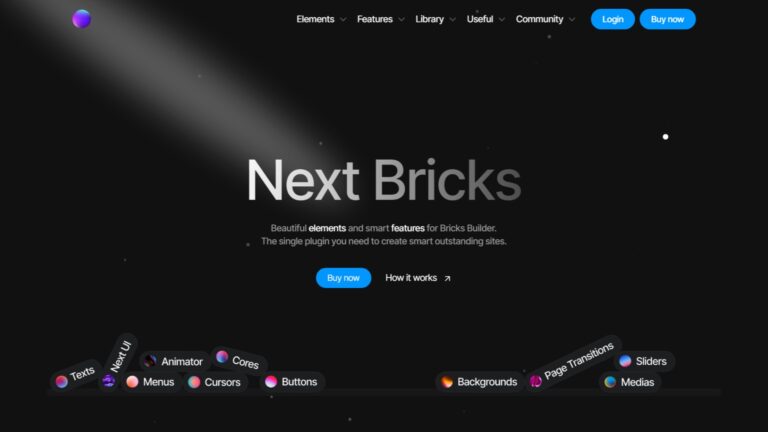
Most of what Next Bricks ships as elements, you can technically build with JavaScript. Animated text, custom cursors, page transitions, background effects: all achievable with code. The real question is whether you should spend the time writing and maintaining those scripts for every project, or pay a one-time fee and get them as maintained, UI-configured elements inside Bricks Builder. For most developers working on client projects, that math is fairly clear.
Next Bricks is built by Jose Tamu, one of the more credible solo developers active in the Bricks ecosystem. He also created OxyFolio, Dancepad, and FigPress, both recognized products in the modern page builder communities. That track record matters when you are evaluating whether a third-party addon is worth depending on.
I tested it for this review and researched community feedback across Web, YouTube, Discord, and communities before writing this. My overall rating is 4.5 out of 5.
Key Highlights
- Next Bricks ships 50+ unique, opinionated elements across 8 categories: Texts, Buttons, Menus, Cores, Medias, Cursors, Sliders, and Backgrounds, with v2.3 released April 2026
- Animator integrates the popular GSAP library as a built-in panel inside Bricks Builder, with timelines, folders, and scroll-triggered animations configured without writing JavaScript
- Page Transitions integrates Barba.js directly into Bricks with automatic timeline triggering and a built-in Lite Animator, removing the need for custom development implementation
- Next UI reorganizes the Bricks Builder interface itself, a practical addition for developers who work in Bricks daily and want a faster workflow without switching to external tools
- The full Next Bricks bundle is €259 one-time for unlimited websites and lifetime updates, with Features and Elements sold separately at €99 and €169, respectively
- Third-party element plugins create a hard build dependency that template plugins do not: if the plugin breaks on a major update, manual removal and rebuilding are required across every affected page
- A live playground is available before purchase, giving you full access to every element and feature in a real WordPress environment at no cost
What is Next Bricks & Who is It Built For?
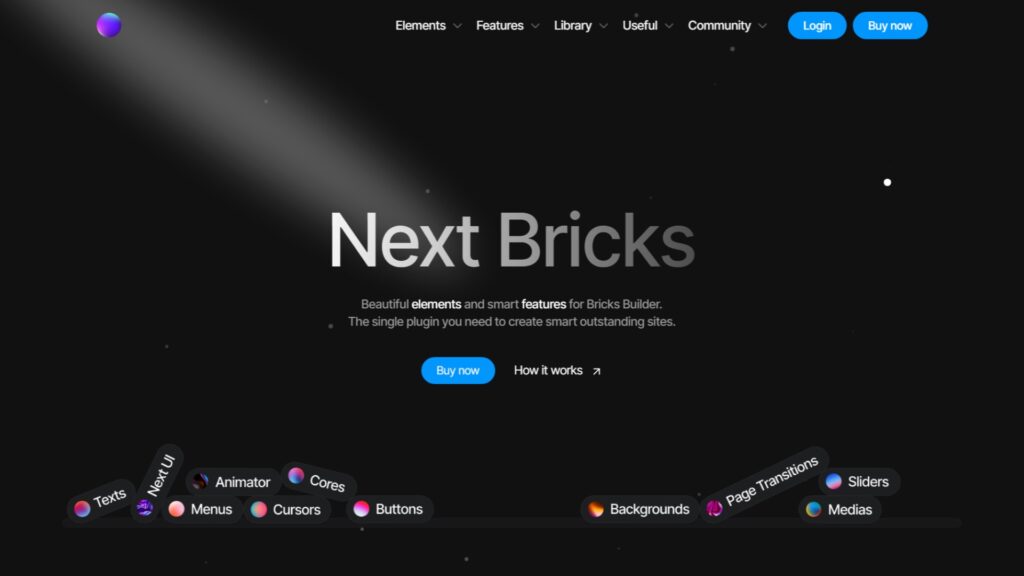
Next Bricks is a premium Bricks Builder addon that extends the core builder with additional elements, an animation system, page transitions, and a prebuilt library. It ships across 8 element categories plus 3 standalone features (Next UI, Animator, Page Transitions) and a template and component library. The target user is a Bricks developer building visually distinctive, motion-heavy websites without writing custom JavaScript from scratch on every project.
Pricing & Plans
Next Bricks offers four lifetime plans from €99 to €259 one-time. The Features plan covers Next UI, Animator, and Page Transitions. The Elements plan covers all 50+ elements. The Library adds templates and components. The full bundle at €259 covers everything and is the plan most users with real project needs will end up buying.
| Plan | Price | What’s included |
|---|---|---|
| Features | €99 one-time | Next UI, Animator, Page Transitions, lifetime updates, unlimited websites |
| Elements | €169 one-time | All 8 element categories (50+ elements), lifetime updates, unlimited websites |
| Library | €239 one-time | All elements, all templates, all components, lifetime updates, unlimited websites |
| Next Bricks (full) | €259 one-time | All elements, all features, all templates, all components, lifetime updates, unlimited websites |
Pricing is not fixed. As stated on the official pricing page, it increases with each new version release. Current figures reflect v2.3, released April 2026.
What Does Next Bricks Do Well?
Next Bricks earns its rating on three things: elements in categories where core Bricks genuinely falls short, an Animator feature that packages GSAP as a no-code panel, and developer credibility that meaningfully reduces the abandonment risk compared to most third-party addons. Together, these separate it from the larger element libraries in the Bricks addon market.
Elements that Solve Problems: Core Bricks Does Not
The most valuable Next Bricks elements sit in categories where core Bricks leaves a real gap: custom cursors, animated and interactive backgrounds, text reveal effects, and interactive menus. These require substantial JavaScript to build natively. Getting them as maintained, UI-configured elements removes both the build time and the ongoing compatibility burden.
The Cursors category handles custom cursor effects that would otherwise require event listeners, CSS transitions, and careful cross-device handling. The Backgrounds category delivers animated backgrounds without manually loading third-party libraries. The Texts category covers animated headlines and typewriter effects. These are elements that clients on portfolio, agency, SaaS, and high-end services sites expect to see.
One thing worth noting from my research: Next Bricks elements are intentionally opinionated. They suit specific visual directions. That is a design strength for the right project type, but it means some elements will not fit every brand or every client brief.
Animator: GSAP-Powered Motion without Writing JavaScript
Animator is Next Bricks’ standalone animation system, built on GSAP under the hood and accessed through a built-in panel inside Bricks Builder. It supports timelines, folders, infinite animations per timeline, a timeline view for visualizing durations and delays, and full method and property customization. All of this runs without writing a single line of JavaScript.
GSAP is one of the most respected animation libraries in professional web development. Implementing it natively in Bricks means writing your own JavaScript, managing version updates, and handling browser edge cases on every project. Animator removes that entirely.
The panel is resizable, has its own theme switch, and supports a custom keyboard shortcut to toggle it. These are the kinds of details that signal an actively maintained tool rather than a hastily shipped one.
Page Transitions: Barba.js as a Native Bricks Feature
Page Transitions integrates Barba.js directly into Bricks Builder. Timelines from Animator and other Next Bricks elements trigger automatically. You can also configure custom content at a dedicated dashboard area. The feature includes its own Lite Animator and a timeline view where entered animations are grouped with automatic delays.
Smooth between-page transitions are the kind of feature I have only seen implemented well through custom development work or dedicated standalone plugins. Having it packaged inside an addon that also handles your elements and animation system is a meaningful convenience.
Developer Credibility Changes the Risk Calculation
Jose Tamu has a verifiable track record in the Bricks ecosystem. Beyond Next Bricks, he built Oxyfolio, Dancepad, and FigPress, both recognized and actively maintained products within the community. His public site at josetamu.com and engagement in the official Next Bricks Facebook community show consistent presence.
An active developer with multiple shipped products, a public roadmap, and community engagement is meaningfully safer to depend on than an anonymous developer releasing a first product. This is one of the criteria I check before recommending any third-party tool to anyone, and Next Bricks passes it clearly.
Where Does Next Bricks Fall Short?
Next Bricks has two real limitations. First, like every element-level addon for Bricks, it creates a hard build dependency that template plugins do not carry. Second, the pricing structure splits Features and Elements into separate tiers, which means the practical cost for most users is €259, not the €99 or €169 shown first on the pricing page.
Third-Party Element Dependency is a Concern Worth Taking Seriously
Any plugin that adds custom elements to your Bricks builds creates a hard dependency. If you stop using Next Bricks, or if the plugin becomes incompatible after a major Bricks or WordPress update, every instance of those elements in your builds needs manual removal and rebuilding with core Bricks elements or custom code. This applies to every element addon for Bricks, not only Next Bricks.
This is my personal reason for being selective about which element plugins I add to client builds. Template plugins are safer than element plugins. You can copy template code, migrate it, or rebuild it. An element plugin is baked into every page and section where you used it. If the plugin ever breaks and you have deployed it across 20 or 30 client sites, the cleanup work is yours to handle.
Jose Tamu’s track record reduces this risk meaningfully. But it does not eliminate it. Think about how many client sites you plan to deploy these elements on before committing, and whether the visual payoff justifies the dependency at that scale.
Pricing that Makes the Effective Entry Point Higher than Advertised
The Features plan at €99 covers Animator, Next UI, and Page Transitions. The Elements plan at €169 covers all the elements. Most users will want both, which means the practical entry point is the full Next Bricks bundle at €259, not the lower tiers displayed first.
To be clear: €259 for an unlimited-site lifetime license covering elements, animation, and page transitions is fair pricing for what you get. The friction is in how the tiers are presented. Leading with €99 and requiring an upgrade to €259 for the complete feature set creates an expectation gap that a single comprehensive tier would avoid.
Who Should NOT Use Next Bricks?
Next Bricks makes no sense outside Bricks Builder. It has no application for Elementor, Divi, block-based, or any other builder. It also makes less sense for developers who prioritize keeping client builds free of third-party element dependencies, or for agencies managing large portfolios where a future compatibility issue across dozens of installs would create significant cleanup work.
Situations Where Next Bricks is the Wrong Choice
Avoid deploying Next Bricks elements at scale on high-volume client portfolios where long-term maintenance continuity is critical. The dependency risk compounds with each additional site you use the elements on. For developers with a build philosophy that avoids third-party element plugins entirely, the template and component library built using core elements is a safer use of the plugin than the elements themselves.
How Does Next Bricks Compare to Alternatives?
Compared to the main Bricks addon options, Next Bricks is the strongest pick for motion-heavy and visually distinctive builds where its opinionated element style matches the project brief. BricksExtras covers more practical everyday UI component territory. BricksForge is a direct competitor on the animation and page transitions side. The right choice depends on what your specific projects actually need.
Quick Comparison: Next Bricks vs BricksExtras vs Max Addons
These three addons take different positions in the Bricks ecosystem. Next Bricks leads on animations, page transitions, and visually distinctive elements. BricksExtras leads on production-ready everyday UI components. Max Addons gives you a free starting point with Pro upgrade flexibility. None of them is the automatic best pick across all project types.
| Product | Best for | Pricing | Key differentiator |
|---|---|---|---|
| Next Bricks | Motion-heavy, visually distinctive builds | €259 one-time (full bundle) | Animator (GSAP), Page Transitions (Barba.js), opinionated design elements |
| BricksExtras | Practical everyday UI components | $79/year or $229 lifetime | 40+ production-ready elements, broad component coverage |
| BricksForge | Motion-heavy, visually distinctive, and dynamic builds | $109/year or $349 lifetime | GSAP-powered animations, page transitions, and advanced dynamic features |
| Max Addons for Bricks | Free entry point with upgrade path | Free + Pro from $59/year | Free tier available, WooCommerce elements in Pro |
Verify current pricing on official sites before purchasing.
For a full picture of the Bricks Builder addons available, including how these tools compare across more criteria, the roundup covers every major option.
Is Next Bricks Worth It?
Next Bricks is worth the investment for Bricks Builder developers building sites where Animator, Page Transitions, or visually distinctive elements would otherwise require custom JavaScript work. At €259 one-time for unlimited websites with lifetime updates, the full bundle holds fair value for the right use case. Use the elements selectively, and the dependency concern is manageable.
Final Scorecard
Next Bricks earns 4.5 out of 5. The element quality, developer credibility, and GSAP-powered Animator are genuinely strong. It loses half a point for the split pricing that pushes most users to the €259 tier, the opinionated element style that limits fit across all project types, and the inherent dependency risk that applies to any element-level Bricks addon.
| Criterion | Score | Note |
|---|---|---|
| Element variety and uniqueness | 4.5/5 | Cursors, backgrounds, and text effects fill genuine Bricks Builder gaps |
| Visual quality and design | 4.5/5 | High production quality; opinionated style suits specific project types |
| Developer credibility | 5/5 | Jose Tamu’s track record across Dancepad, FigPress, and Next Bricks |
| Animator and Features value | 4.5/5 | GSAP and Barba.js delivered as no-code Bricks-native panels |
| Value for money | 4/5 | €259 is fair for unlimited lifetime; split pricing adds friction |
| Support and documentation | 4/5 | Active Facebook community, public roadmap, 30-day refund policy |
Overall: 4.5 out of 5
| Pros | Cons |
|---|---|
| 50+ unique elements in categories, core Bricks does not cover well | Creates a hard build dependency on a third-party plugin |
| Animator brings GSAP-powered motion to Bricks without custom code | Practical full bundle costs €259, not the headline €99 |
| Page Transitions integrates Barba.js as a native Bricks panel | Opinionated element style may not fit every client brand |
| Developer with a verified track record across multiple products | A solo developer carries inherent continuity risk |
| Free playground for full testing before purchase | Features and Elements sold in separate pricing tiers |
| Lifetime updates, unlimited websites, 30-day refund policy | EUR pricing feels steep at the current exchange rates for the other markets |
FAQs About Next Bricks
What is the Next Bricks playground, and how do I access it?
The Next Bricks playground is a free, temporary WordPress environment via InstaWP, accessible from the official pricing page.
It comes pre-installed with all Next Bricks elements and features, so you can test everything before purchasing.
The site expires after a set window, but it gives enough time to evaluate whether the plugin fits your workflow before committing.
Can I use Next Bricks on unlimited websites?
Yes. All four Next Bricks plans include unlimited website usage with no per-site fees or additional licensing costs.
The Features, Elements, Library, and full Next Bricks bundle all carry the same unlimited site coverage. There are no restrictions on deploying the plugin across personal projects, client sites, or staging environments.
Does Next Bricks affect website loading speed?
Any plugin that adds scripts to a website has some performance impact.
Next Bricks loads scripts conditionally based on the elements in use, which reduces unnecessary overhead. That said, the Animator and Page Transitions features load GSAP and Barba.js, respectively, both substantial libraries.
On performance-critical projects, these require proper caching, deferral, and CDN setup to keep load times in check.
What happens if Jose Tamu stops developing Next Bricks?
Existing installs continue working until a major Bricks Builder or WordPress update breaks compatibility. At that point, any elements in your builds need manual removal and rebuilding with core Bricks elements or custom code.
Jose Tamu’s track record across multiple products and active community presence reduces this risk considerably, but no third-party plugin is fully immune to this scenario. Think through your exposure before deploying at scale.
Which Next Bricks plan should I buy?
The full Next Bricks bundle at €259 is the only plan covering both elements and features.
The Elements plan (€169) excludes Animator and Page Transitions. The Features plan (€99) excludes all elements. If you want the Animator or Page Transitions alongside the visual elements, you need the full bundle.
The only reason to buy a lower tier is if you genuinely need one side of the product without the other.
Conclusion
Next Bricks holds a clear and well-earned position in the Bricks Builder addon space. Jose Tamu has built something that genuinely extends what Bricks can do, particularly for developers working on motion-heavy or visually ambitious projects where custom JavaScript is the only other route.
The element dependency concern is real, but manageable. Use the elements selectively, keep the playground test honest, and think about how many client sites you are prepared to commit this plugin to before you buy. The more sites, the more the risk compounds.
If your builds regularly need what Next Bricks offers, the €259 full bundle earns its price. If you mostly need practical UI components for straightforward client work, BricksExtras or Max Addons will serve you better at a lower commitment.
The playground exists for a reason. Test it before deciding.
If you need a WordPress development partner who builds with Bricks Builder and understands the full addon ecosystem, we work with clients worldwide.