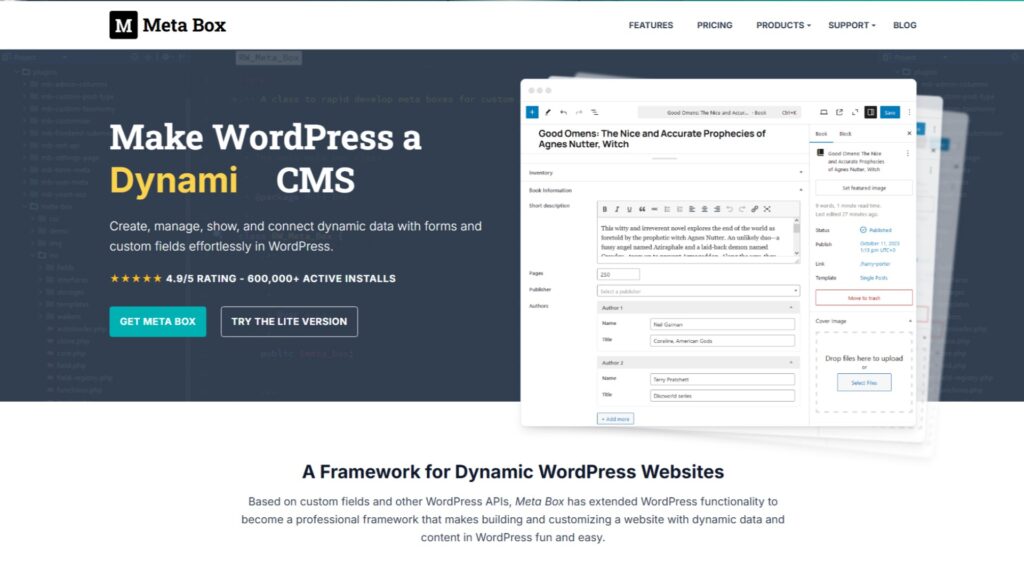
Meta Box is one of the most technically complete custom content plugins in WordPress. It handles custom post types, taxonomies, fields, settings pages, and custom database tables through a modular extension model built for developers. The full agency bundle is worth the cost for anyone building sites at volume. For beginners who just need basic custom fields, it is more than most projects require.
- Overall rating: 4.1 / 5
- Features: 4.5
- Performance: 4.5
- Ease of use: 4
- Support: 4
- Pricing: 3.5
Meta Box is worth it. That is the short answer.
I have been using it on every WordPress project I build, personal and client, for years. The full agency lifetime bundle has been active across my setups since the day I bought it. At this point, it is as close to a default tool as I have in my WordPress workflow.
This review covers what Meta Box actually does, where it earns that confidence, where it still falls short, and who should and should not buy it.
Key Highlights
- Meta Box handles custom post types, custom taxonomies, custom fields, settings pages, and custom database tables through one connected ecosystem, with no third-party addons required
- The full agency lifetime bundle at $699 one-time is the only sensible purchase path. Individual extensions cost significantly more when bought separately
- Meta Box stores one row per populated custom field in
wp_postmetaand skips empty rows. The MB Custom Table extension bypasseswp_postmetaentirely for large-scale builds - A high number of active custom fields can trigger PHP’s default
max_input_varslimit of 1000, causing fields to stop saving silently. This is a PHP and WordPress server limitation, not specific to Meta Box. Increasing it to 10000 inphp.iniresolves it - Settings pages with field groups are one of Meta Box’s most underused features. They allow global site content like CTAs and contact details to be updated from one place and pulled anywhere on the site
- Meta Box does not include a native data migration tool for moving fields between field groups or post types. Free third-party solutions exist, but a native option is missing
What is Meta Box & Who is it Built For?
Meta Box is a modular WordPress plugin that handles custom post types, custom taxonomies, custom meta fields, settings pages, and front-end output through a core plugin and a set of extensions. It is not a beginner’s tool. Custom post types, field groups, taxonomies, and settings pages are concepts that developers and technically experienced professionals use to make WordPress sites more dynamic and organized. Someone who just wants to add a text field to a post might not need Meta Box at all.
For developers and agencies building structured, data-driven WordPress sites, it is one of the most complete tools available. The modular architecture means you activate only what a given project needs, which keeps the codebase lean.
The full Meta Box product page on WPnomy covers the technical specs in detail for those evaluating it against alternatives.
What Does Meta Box Do Well?
Meta Box covers a wide range of use cases with deep functionality. The areas where it earns the most trust are custom post types, taxonomies, settings pages, database performance, and page builder integration.
Custom Post Types that Keep Your Site Organized
Every website I build gets at least one custom post type. Testimonials, portfolio entries, glossary terms, product listings: these belong in their own content types, not mixed into the standard Posts or Pages. Meta Box makes this registration clean and straightforward, either visually through MB Builder or through code.
The WordPress Products directory on WPnomy runs entirely on a Meta Box custom post type. Field groups attached to those posts power the product details, ratings, and structured data across the entire directory. No hacks, no workarounds.
Custom Taxonomies for Filters & Content Logic
Native WordPress categories and tags cover basic needs. They do not cover the kind of structured filtering most professional sites require. Meta Box’s custom taxonomy registration fills that gap cleanly.
One use I keep coming back to: page stages. I create a custom taxonomy with terms like Alpha, Beta, and Release Candidate, then assign posts to a stage. Anything not at Release Candidate gets conditionally hidden from the front end. It gives me a simple editorial workflow without needing a separate plugin or post status logic.
The WPnomy products directory uses multiple custom taxonomies for filtering: product type, pricing model, and alternatives. These are built entirely with Meta Box and power the directory’s filter UI.
Settings Pages for Global Content & Safe Client Handovers
Settings pages are the most underused Meta Box feature I know of. You create a settings page, attach a field group to it, and any content you add there can be pulled anywhere on the site using a single function call or a page builder dynamic tag.
The practical value for client handovers is real. When I hand a site to a client, they can update their CTA text, phone number, address, or social links from one place in the backend. They never need to open Bricks, Elementor, or Oxygen to make those changes. The page builder design stays untouched. This is the clearest Meta Box win I keep seeing across projects.
Database Performance with MB Custom Table
Meta Box stores one row per populated custom field in WordPress’s wp_postmeta table, which is already cleaner than ACF’s double-row model. The MB Custom Table extension takes it further by storing entire field groups in dedicated SQL tables, bypassing wp_postmeta entirely.
For directories, catalogs, and any site with large post volumes and dense custom data, this architectural difference translates into measurably faster page loads and admin performance. Most standard marketing sites will not notice the difference. Sites with thousands of posts will.
Deep Page Builder Integration
Meta Box has deep native integrations with Bricks Builder and Breakdance, and solid compatibility with Elementor and Oxygen. Dynamic fields from Meta Box map directly to page builder elements without custom code. For developers who build with Bricks or Breakdance, this integration is seamless and reliable in a way that a lot of third-party field plugins are not.
Where Does Meta Box Fall Short?
Meta Box covers most of what a custom content plugin should do. A few gaps are worth knowing upfront.
No native data migration. If you rename a field, move data from one field group to another, or switch from one post type to a different one, Meta Box does not include a built-in migration tool. You either write a custom script or use a third-party plugin. This is the one operational gap that comes up most on larger, evolving projects. For free plugins that handle this kind of data movement, the unusual WordPress plugins list on WPnomy covers a few worth knowing.
No Local JSON equivalent. ACF saves field group definitions as JSON files in your theme, which makes version control and deployments cleaner. Meta Box does not have a native equivalent. For teams using Git-based deployment workflows, this is a real gap.
The extension model requires upfront planning. Meta Box’s modular approach is a strength for experienced developers and a friction point for everyone else. You need to know which extensions a project needs before you start, or you end up activating and deactivating things as the scope grows. It rewards planning. It penalizes winging it.
Not built for beginners. This is by design, not a flaw. If your users or clients want to add custom fields to a site themselves without developer involvement, the learning curve is real. The UI is clean and well-organized, but understanding why you would use a custom post type, taxonomy, or settings page requires a developer mindset. Meta Box assumes you already have one.
How Does Meta Box Compare to Alternatives?
The detailed comparisons live in their own articles in this cluster. The table below gives a quick reference for the three main tools.
| Factor | Meta Box | ACF Pro | ACPT |
|---|---|---|---|
| Field types | 40+ | 30+ | 30+ |
| Custom database tables | Yes (native) | Third-party only | No |
| Gutenberg block builder | Yes (MB Blocks) | Yes (ACF Blocks) | No |
| Settings pages | Yes (native) | Yes (Options Pages add-on) | No |
| Visual template builder | Yes (MB Views) | No | Yes |
| Local JSON / version control | No | Yes | No |
| Lifetime unlimited license | $699 one-time | Not available | $199 one-time |
| Community and tutorials | Large | Largest | Small but growing |
(For the full breakdown: Meta Box vs ACF, Meta Box vs ACPT, and ACF vs ACPT)
What Does Meta Box Cost, and Which Plan Should You Get?
The first pricing rule for Meta Box is simple: do not buy extensions individually. The per-extension cost adds up to significantly more than any bundled tier. The only path that makes financial sense for professional use is the bundle.
The lifetime unlimited agency bundle is $699 one-time and includes every extension with unlimited site usage. For an agency building client sites at volume, that cost recovers within a handful of projects and never renews.
| Plan | Cost | Sites | Notes |
|---|---|---|---|
| Meta Box Lite | Free | Unlimited | Includes MB Builder, CPTs, and taxonomies |
| Single site (annual) | $49/year | 1 | Core fields + MB Builder |
| Agency unlimited (annual) | $229/year | Unlimited | All extensions included |
| Lifetime unlimited | $699 one-time | Unlimited | All extensions, no renewals |
Which Extensions Are Essential and Which Are Situational?
Meta Box Lite already includes MB Builder, custom post type registration, and custom taxonomy registration for free. These cover a large portion of basic use cases. The extensions below go beyond that.
Use on almost every professional build:
- MB Settings Page: essential for any site with global reusable content or client handover requirements
- MB Views: for building front-end output without modifying theme files, using Twig templating
- MB Custom Table: for any site with high post volumes or dense custom field sets
- MB Admin Columns: displays custom field values in WordPress admin list tables, useful for managing content at scale
Use when the project calls for it:
- MB Relationships: for bidirectional connections between post types, such as linking products to reviews or authors to courses
- MB Blocks: for PHP-based custom Gutenberg block development without React
- MB Frontend Submission: for sites that need user-generated content submitted through front-end forms
- MB User Meta / MB Term Meta / MB Comment Meta: for attaching custom fields to user profiles, taxonomy terms, or comments
Most builds will not need all of these at once. The lifetime bundle means you can activate what the project needs from the AIO dashboard without paying per extension.
Is Meta Box Worth It?
Yes, for the right user. The rating breakdown below reflects honest experience across years of active use.
| Area | Rating | Notes |
|---|---|---|
| Features | 4.5 / 5 | One of the most complete field and content management ecosystems in WordPress |
| Performance | 4.5 / 5 | Custom table architecture and clean storage model are genuine advantages at scale |
| Ease of use | 4 / 5 | Clean UI once you understand it. Requires a developer or technical mindset to get full value |
| Support | 4 / 5 | Responsive documentation and community. Single-vendor dependency is worth noting |
| Pricing | 3.5 / 5 | Lifetime bundle is strong long-term value. Individual addon pricing is steep and the reason the 3.5 exists |
Overall: 4.1 / 5
Pros:
- Complete built-in ecosystem with no required third-party addons
- Custom database table support is a genuine performance differentiator
- Settings pages for global content are underrated and practical
- Lifetime unlimited bundle eliminates all future renewal costs
- Deep integrations with Bricks Builder, Breakdance, Elementor, and Oxygen
Cons:
- No native data migration tool for fields or post types
- No Local JSON support for version-controlled deployments
- Extension model requires upfront planning
- Not beginner-friendly by design
- Individual extension pricing is steep if you buy piecemeal
If you are a developer or agency building structured WordPress sites at any real volume, Meta Box is the most complete tool in this category. If you are a beginner who just wants to add a few extra fields to a page, it is more than you need right now.
FAQs About Meta Box
Meta Box is the most technically complete custom content plugin in the WordPress ecosystem. The questions below address the most common decision points for developers and agencies evaluating it.
Is Meta Box free or paid?
Meta Box Lite is free and available on the WordPress plugin directory. It includes the MB Builder visual interface, custom post type registration, and custom taxonomy registration.
The paid extensions, including MB Settings Page, MB Views, MB Custom Table, MB Relationships, and MB Blocks, require a license.
The lifetime unlimited bundle at $699 one-time is the recommended purchase path for professional use, as individual extension pricing adds up quickly.
Is Meta Box better than ACF?
Meta Box has the technical edge: more field types, native custom database table support, a built-in settings page extension, and a lifetime licensing model that ACF no longer offers.
ACF has the community edge: a larger install base, more tutorials, and the widest third-party plugin support in the category.
For experienced developers and agencies, Meta Box is the stronger long-term choice. For beginners and teams inheriting ACF builds, ACF’s community resources are a practical advantage.
Read the full Meta Box vs ACF comparison for the detailed breakdown.
What is the max_input_vars issue and does it affect Meta Box?
PHP’s default max_input_vars setting is 1000. When a WordPress page sends more form inputs than that limit, the server silently drops the excess and fields stop saving.
This is a PHP and WordPress server limitation that affects any custom fields plugin, including Meta Box and ACF, when a large number of fields are active on a single post type.
Increasing max_input_vars to 10000 in your server’s php.ini resolves it. Any build with a high field count should apply this before going live.
Can Meta Box handle client handovers without breaking page builder designs?
Yes, and this is one of its strongest practical advantages.
By attaching custom field groups to a settings page and post types, clients can update global content like CTAs, contact details, and social links, and posts from the WordPress backend without ever opening Bricks, Elementor, Oxygen, or any other page builder.
The design stays untouched. Updates on the settings page propagate everywhere the field is used on the site. For agencies handing projects to non-technical clients, this is a setup worth building into every project.
Should I buy Meta Box extensions individually or as a bundle?
Always buy the bundle.
Individual extensions cost significantly more when purchased separately than through the agency or lifetime tier. The lifetime unlimited bundle at $699 one-time includes all extensions for unlimited sites with no future renewals.
For any agency or freelancer building more than a few client sites per year, the bundle pays for itself quickly and eliminates recurring software overhead permanently.
Conclusion
Meta Box is the best custom content plugin I have used in WordPress. That is not a neutral statement, and I know I am probably biased after years of daily use. But I have also spent time inside ACF on client sites, tested ACPT, and looked at the alternatives across this category. Nothing else matches the combination of database architecture, extension depth, and a lifetime license that stops billing.
The data migration gap is real and worth fixing. The lack of Local JSON is a genuine inconvenience for deployment-heavy workflows. The extension model is not beginner-friendly by design.
For developers and agencies building structured, data-driven WordPress sites at any real volume, Meta Box is the right tool. The lifetime bundle is the right purchase. And the settings page workflow alone has saved more client handovers than I can count.
If you want your WordPress site’s custom content architecture set up properly from the start, our WordPress support covers custom post types, field group structure, settings pages, database performance, and server configuration.
For WordPress developers and agencies in India and Kolkata: if you are building client sites at volume and want to stop paying annual plugin fees, we help teams in Kolkata and across India build sustainable, cost-effective WordPress setups using the right tools from the start. Get in touch with SyncWin to talk through your next build.