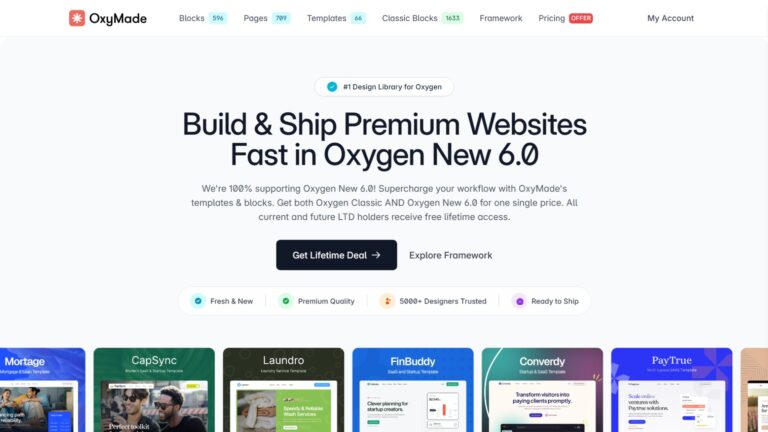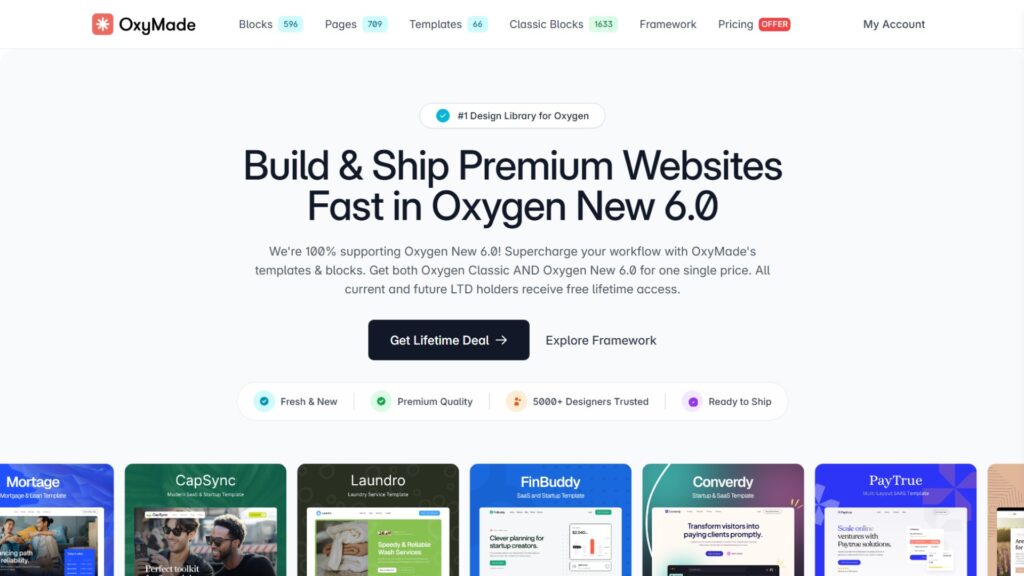

OxyMade is a utility-first CSS framework and design system built exclusively for Oxygen Builder 6. It adds 60+ CSS variables, 200+ utility classes, and niche-specific design sets to Oxygen’s blank canvas. With ACSS declining O6 support, OxyMade is the primary dedicated CSS framework for the O6 ecosystem. My hands-on rating: 4.5 out of 5.
I’ve been using OxyMade since its Oxygen Classic days, where it served personal sites and client builds reliably for years. When Oxygen Builder 6 launched on the Breakdance core and broke backward compatibility with everything, the ecosystem needed a new answer fast.
ACSS, the framework I use daily with Bricks Builder, officially passed on Oxygen 6 support. That created a real gap. OxyMade rebuilt itself for the new O6 architecture and stepped in as the dedicated framework.
I’m testing the O6 version on staging environments now as I plan to run Oxygen 6 alongside Bricks for select future projects. Here’s my honest take.
Note: This review covers OxyMade for Oxygen Builder 6. If you’re still using Oxygen Classic, the OxyMade Classic review covers that version separately.
Key Highlights
- OxyMade works exclusively with Oxygen Builder 6; it has no compatibility with Bricks, Breakdance standalone, Elementor, or any other page builder
- The framework injects 60+ global CSS variables and 200+ utility classes into Oxygen’s UUID-based selector system
- Automated shade generation creates 11 color variants from a single hex input, covering backgrounds, surfaces, borders, hover states, text, and dark mode targets
- Mix-and-match sections across different design sets is the standout feature: combine blocks from multiple template libraries into one original page without style conflicts
- ACSS officially declined Oxygen 6 support, making OxyMade the only serious dedicated CSS framework currently available for O6 developers
- Existing Oxygen Classic OxyMade license holders received the O6 version included at no extra cost
- Oxygen Classic-only addons like Swiss Knife and Plain Classes are not compatible with Oxygen 6, despite appearing in some older OxyMade references
- Overall rating: 4.5 out of 5
What is OxyMade & Who is It Built For?
OxyMade is a CSS framework and design system created by developer Anvesh G, designed specifically to provide Oxygen Builder 6 with a structured starting point. A fresh O6 installation ships with no global classes, typography variables, or spacing structure. OxyMade fills that gap with a pre-built system and a library of niche-ready design sets.
What Does OxyMade Cost & What Does Each Plan Include?
The free tier covers the core utility framework and basic access to the locally bundled Layers design set. Paid tiers include the full Layers system and premium remote templates for $149 with Unlimited All-Access as a lifetime deal. Individual premium templates are available at $49 each. Verify current pricing directly on the OxyMade website before purchasing.
| Plan | Price | What’s included |
|---|---|---|
| Free | $0 | Core framework for Oxygen New 6.0 builders |
| Design Set Only | $149 (one-time) | Oxygen Classic and Oxygen New 6.0 blocks – both versions included |
| Templates Only | $149 (one-time) | Oxygen Classic and Oxygen New 6.0 templates – both versions included |
| Unlimited Lifetime Access | $249 (one-time) | Oxygen Classic and Oxygen New 6.0 – templates & blocks for both versions included! |
Existing OxyMade Classic license holders received the Oxygen 6 upgrade as part of their license. I fell into this category, which meant no additional cost to access the O6 version.
What Does Oxy Made Do Well?
OxyMade‘s strongest points are its automated design system tools, the CSS variables, and the shared CSS architecture that makes cross-template section building possible without style conflicts.
Automated Color Palette from a Single Hex Input
OxyMade generates 11 shade variants from a single base color input, covering backgrounds, surfaces, borders, hover states, text, and dark mode targets across five semantic channels: Primary, Secondary, Tertiary, Accent, and Neutral. This replaces 20 to 30 minutes of manual color work per brand channel with a single field in the Oxygen panel. The semantic naming structure also makes future edits predictable.
I’ve built color systems manually, and it’s genuinely tedious work. Tracking 11 variants per channel, naming them consistently, and making sure hover states have the right contrast ratios eats time on every project. OxyMade compresses that entire process to one input. The output is immediately usable inside the builder without additional setup.
Fluid Typography that Needs No Breakpoint Management
Typography scales continuously between viewport widths on a Perfect Fourth ratio (1.333) across 14 size steps. There are no fixed breakpoint overrides to maintain and no manual step-downs at specific screen widths. Headers and body text stay proportionate at every screen size automatically once the scale is active.
This sounds like a minor convenience until you’ve spent an afternoon tracing a font-size regression across four breakpoints on a live site. Fixed breakpoint typography creates jarring visual jumps at specific widths and creates a maintenance obligation every time a layout changes. Fluid scaling removes both problems.
Mix-&-Match Sections Using a Shared CSS Architecture
Sections from different OxyMade design sets can be combined on the same page without style conflicts because every set shares the same underlying CSS variable architecture for colors, spacing, and typography. Copy a section from one template, paste it onto a canvas already using another template, and the tokens carry over cleanly.
The workflow currently requires going to the OxyMade website to copy sections rather than accessing them inside the editor. That adds steps, and I would like to see in-editor access added in a future update. But the core capability of mixing sections without creating a style conflict is solid and genuinely useful for building original-looking pages faster.
Large Blocks & Templates Library for Professional Oxygen 6 Builds
OxyMade ships 13+ niche-specific premium design sets alongside a blocks library covering hero sections, feature layouts, pricing tables, testimonials, and more. For O6 developers, this is the largest ready-to-use professional design library available for the builder. The niche targeting covers industries from financial technology and insurance to creative agencies and industrial businesses.
Most CSS frameworks for WordPress builders either offer a handful of generic layouts or charge per design set separately. OxyMade’s Unlimited tier gives access to all of them at one price. For client work across different verticals, having a dedicated design set per industry is a real-time advantage.
Lifetime Pricing with Free Upgrade for Classic License Holders
Unlimited All-Access is available as a one-time lifetime deal. Developers who owned an OxyMade Classic license received the O6 upgrade included at no extra cost. For agencies running multiple client projects, a predictable one-time cost is more manageable than annual subscription billing that compounds with every new seat.
I received the O6 upgrade free with my existing Classic license. Zero additional cost to access everything the rebuilt version offers. Even at full price for a new purchase, the lifetime structure works out favorably compared to annual alternatives when you’re building more than a few projects per year.
Where Does OxyMade Fall Short?
OxyMade’s limitations are mostly architectural trade-offs rather than quality defects. Understanding them up front helps you decide whether it fits your workflow before you commit.
Design Sets Require Copy-Pasting from The OxyMade Website, Not In-Editor Browsing
The O6 version has no in-editor library panel yet. Every section or page template you want to use requires opening the OxyMade website in a separate browser tab, locating the design, copying it, and pasting it into Oxygen. For a full-page build using sections from multiple templates, this means multiple copy-paste cycles across tabs throughout the session.
The Classic version allowed direct library access from inside the builder, which was a faster experience. The O6 version’s copy-paste workflow works cleanly once you understand it, but it adds friction that in-editor access would eliminate. This is the most meaningful workflow difference between the two versions.
Utility-Class-Only Designs with No BEM Conversion or Bulk Class Management
Every design OxyMade ships uses utility classes exclusively. There is no built-in option to convert utility classes to BEM format, and no bulk class management tooling for renaming, moving, or deleting classes in batch. Developers who use BEM methodology will need to manually create their own class structure for each design element in parallel with OxyMade’s utility layer.
For those who want to use the design sets visually but maintain BEM for long-term codebase management, the practical approach is to apply the designs and then assign your own BEM classes to the elements. It works, but it’s additional manual effort. A bulk conversion tool and batch class management options, similar to what ACSS offers, would close this gap significantly.
Strict Five-Step Installation Dependency Chain
OxyMade requires Oxygen 6, Breakdance Elements, and Breakdance Forms to all be active before the setup wizard runs. The sequence is non-negotiable: Oxygen 6 first, then Breakdance Elements, then Breakdance Forms, then OxyMade, then the wizard. Running the wizard before the dependencies are in place causes CSS variable sync failures and can surface errors in the WordPress admin dashboard.
This is a first-install issue more than a daily frustration. Once the chain is set up correctly, it stays set up. But the error messages when something goes wrong do not always point clearly back to the dependency sequence, which makes debugging harder than it needs to be for new users.
Single-Developer Product with LTD Sustainability Considerations
OxyMade is built and maintained by one developer. Any single-developer lifetime deal carries the inherent risk that maintenance may slow or stop if the developer’s circumstances change. For a design system that requires less ongoing active development than a SaaS product, this risk is lower than average.
My general skepticism about niche single-developer LTDs applies here. The developer has maintained OxyMade actively through both the Classic era and the O6 rebuild, which is a positive signal. The honest position is: buy it for active Oxygen 6 projects now, not as a speculative hold. If your project stack changes, you should be able to replace a design system with a custom variable setup without catastrophic disruption.
Who Should Not Use OxyMade?
OxyMade is the wrong choice for anyone not actively building with Oxygen Builder 6. It has no compatibility with Bricks Builder, Breakdance standalone, Elementor, Divi, or any other page builder. The utility-class architecture and single-builder scope rule it out for specific workflows.
Situations Where OxyMade Is Not the Right Tool
OxyMade’s Oxygen 6-exclusive compatibility and utility-class foundation make it a poor fit in these cases:
- You build on Bricks Builder, Breakdance, Elementor, or any other builder
- Your workflow requires pure BEM architecture without a utility-class layer
- You’re an Oxygen Classic-only user with no plans to migrate to O6
- You want a comprehensive CSS utility framework with the depth of ACSS
- Your team-based projects require long-term codebase audits where utility classes complicate maintenance
For Bricks Builder users, ACSS remains the stronger framework option. Free alternatives like Core Framework and Fancy Framework are also worth evaluating. For a broader look at where each WordPress page builder sits in the comparison across major builders, that’s a useful starting point before committing to any framework stack.
How Does OxyMade Compare to Alternatives?
There is currently no direct competitor to OxyMade within the Oxygen 6 ecosystem. The relevant comparison is with ACSS, not because they are alternatives for the same builder, but because they serve similar purposes on different platforms.
OxyMade vs ACSS & Free Framework Alternatives
ACSS is the most capable CSS utility framework available for WordPress page builders today, but it is built for Bricks and officially unsupported on Oxygen 6. Beyond framework depth, ACSS also requires purchasing Frames separately for its wireframe design sets. OxyMade bundles its design sets within the same product at a single one-time price.
| Product | Best for | Price | Key difference |
|---|---|---|---|
| OxyMade Unlimited LTD | Oxygen 6 design system + niche templates | $149 (one-time) | Only dedicated O6 framework; design sets bundled |
| ACSS (Bricks) | Deep CSS utility framework on Bricks and EtchWP | ~$149/year | More powerful framework; Frames sold separately |
| Core Framework (Bricks) | Free ACSS alternative for Bricks | Free | Framework layer only; no design sets included |
| Fancy Framework (Bricks) | Free utility alternative for Bricks | Free | Community-maintained; similar scope to Core Framework |
For Oxygen 6 specifically, OxyMade has no comparable competitor. The comparison to ACSS is context for understanding what kind of tool OxyMade is, not a head-to-head buying decision.
Is OxyMade Worth It?
For anyone actively building with Oxygen Builder 6, yes. The mix-and-match design sets, automated color system, and fluid typography reduce real setup time on every project. The $249 Unlimited All-Access lifetime deal is fair value for the scope of what it delivers.
If you’re not using Oxygen 6, it simply doesn’t apply.
Pros & Cons
Pros
- Mix-and-match sections from any design set
- 11-shade automated color generation from one hex input
- Fluid typography with no breakpoint overrides
- Zero JavaScript frontend dependency
- Lifetime pricing; existing Classic users upgraded for free
- Only a dedicated CSS framework for Oxygen 6 right now
Cons
- A utility-class approach adds complexity at a large team scale
- Strict dependency chain; exact installation order required
- Remote premium templates require the internet to download
- A single-developer product carries some LTD continuity risk
- Framework depth doesn’t match ACSS, though ACSS doesn’t support O6
Final Scorecard
| Criterion | Score /5 | Notes |
|---|---|---|
| Design quality and variety | 4.5/10 | 13+ niche design sets; mix-and-match section support |
| Workflow efficiency | 4/10 | Utility classes work well; BEM users will need to supplement for large builds |
| Performance impact | 4.5/10 | 49KB, zero JS, on-demand class registry |
| Installation and setup | 3.5/10 | Strict dependency chain; order of installation must be exact |
| Value for money | 4.5/10 | $149 LTD; Classic license holders received O6 upgrade at no extra cost |
| Framework depth | 4/10 | Solid CSS variable system; ACSS is deeper but supports Bricks and EtchWP only |
| Overall | 4.5/5 | Strong recommendation for all Oxygen 6 users |
FAQs About OxyMade
Is OxyMade compatible with Oxygen Classic?
OxyMade for Oxygen Classic and OxyMade for Oxygen 6 are separate products built on completely different architectures.
Existing Classic license holders received the O6 version at no extra cost, but the two versions do not share installations or settings.
You cannot use the O6 version on an Oxygen Classic site, and the Classic version does not work on O6 builds.
Does OxyMade work with Breakdance, Bricks Builder, or Elementor?
OxyMade works exclusively with Oxygen Builder 6. Despite O6 sharing a core architecture with Breakdance, OxyMade is not compatible with Breakdance standalone, Bricks, or any other builder.
The framework depends on Oxygen’s specific UUID-based class selector system, which does not exist in other page builders.
Can OxyMade replace ACSS for Oxygen 6 users?
OxyMade is the closest available option to ACSS for O6 developers, but the two tools are not the same in scope. ACSS is a deeper utility framework with more advanced class coverage, built specifically for Bricks and EtchWO.
OxyMade is better described as a design system with a bundled utility layer. For Oxygen 6, OxyMade is the primary choice because ACSS officially declined to support O6.
Is the OxyMade lifetime deal worth buying?
At $249 for Unlimited All-Access, the OxyMade LTD is fair for active O6 developers.
My general skepticism about single-developer LTDs applies here too, but OxyMade is a design system that requires less ongoing development than a full application, which lowers the abandonment risk somewhat.
Buy it if you’re actively building with Oxygen 6 now, not as a speculative hold.
What happens if you install OxyMade before its dependencies are active?
Running the OxyMade setup wizard before Breakdance Elements and Breakdance Forms are active causes CSS variable sync failures and database errors in the WordPress admin.
The fix is to deactivate OxyMade, confirm both Breakdance plugins are active, reactivate OxyMade, and run the wizard again.
The correct sequence is: Oxygen 6, Breakdance Elements, Breakdance Forms, OxyMade, then the setup wizard, in that order.
Conclusion
OxyMade has matured meaningfully since its Oxygen Classic origins. The O6 rebuild addresses a real gap in the ecosystem and does it cleanly. The mix-and-match design system, the automated color engine, and the lightweight CSS-only architecture are genuine strengths. The utility-class approach and strict setup sequence are honest trade-offs, not hidden problems.
If you’re building serious projects with Oxygen 6, this is the framework to start with. There isn’t a comparable alternative in the O6 space right now. That position may change over time, but OxyMade holds it well.
Read my full Oxygen Builder 6 review if you’re still evaluating whether O6 fits your workflow before committing to its framework stack.
If OxyMade fits your Oxygen 6 workflow, you can grab it through our affiliate link. Buying through our link supports the free reviews and comparisons we publish on WPnomy at no extra cost to you.
Building WordPress sites or managing client projects in Kolkata, India, the USA, or anywhere in the world? Our WordPress support service covers Oxygen 6 builds, design system setup, and ongoing site management.